Gameplay
ONE PIECE: Grand Gourmet Layout: Faster Service
Arrange tables, boost comfort, choose themes and move furniture in ONE PIECE: Grand Gourmet, with space for expansion and ways to restock decorations.
Updated
- Guides
- 33
- Topics
- 3
- On this page
- 8
Build Around Your Tables and Keep Routes Clear
Arrange tables inside nearby furniture’s effect areas, group matching categories for themed seating, and keep entrances, corridors and facility access clear. Start with a manageable dining area and leave open space toward your next expansion.
Build a Seating Group You Can Repeat
Leave at least one tile between tables to avoid the comfort penalty from crowding; a two-tile gap gives decorations more room. Test a manageable seating group before extending it across the ship. The furniture you own and its displayed coverage should determine the arrangement.
- Plan the main seating area before filling its edges with large furniture, giving the rest of your design a clear starting point.
- Leave two tiles between tables to provide space for decorations instead of packing seats directly beside each other.
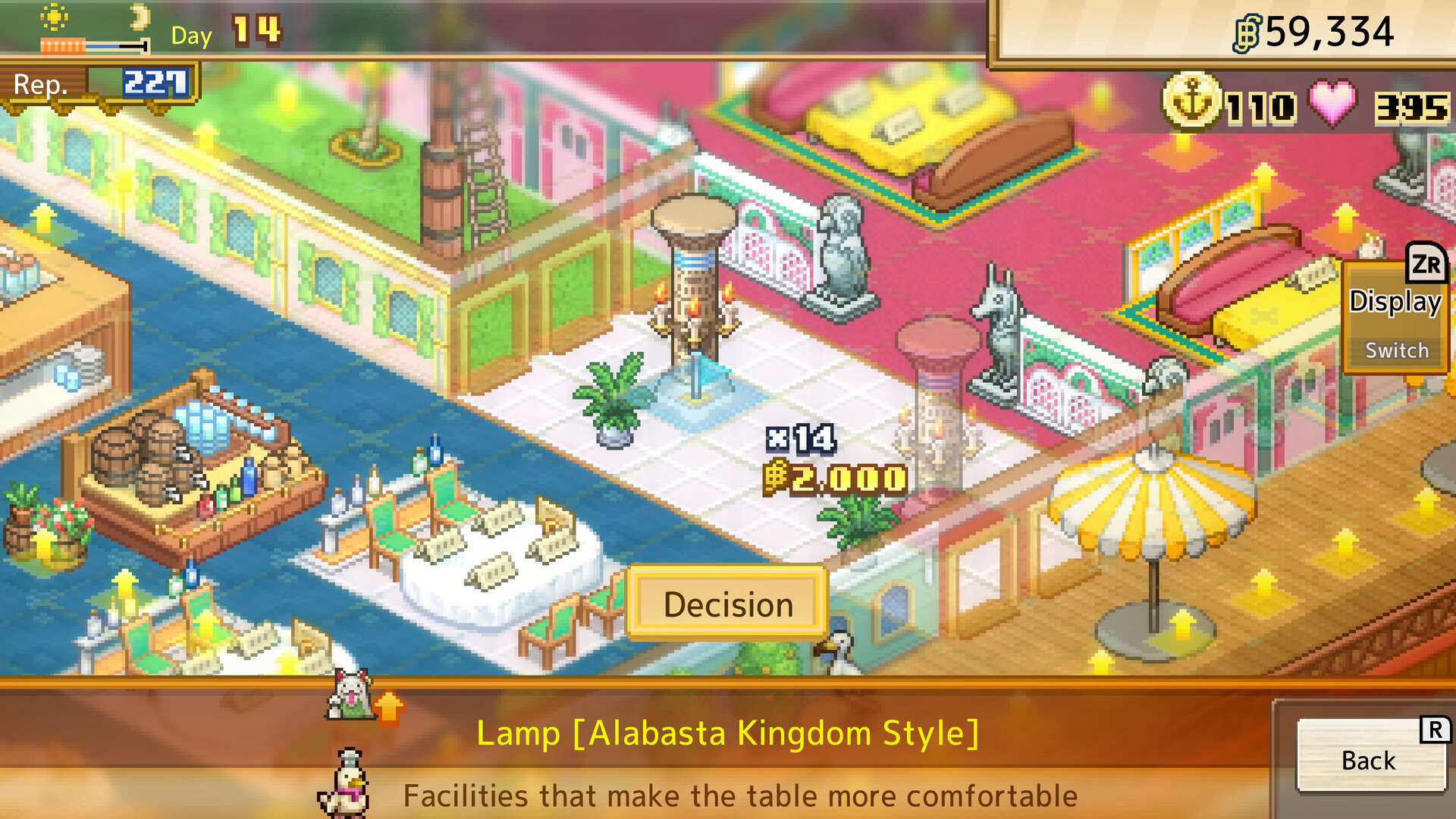
- Select a facility or decoration in Menu → Build to preview its effect area and comfort contribution before spending berries.
- Place the decoration where its displayed effect area covers several tables, making better use of the floor space it occupies.
- Inspect the tables along the group’s edges to check their comfort and category before copying the arrangement elsewhere.
- Repeat the tested seating group where space allows, using its working arrangement as a starting point for the next dining area.
Raise Comfort Without Filling Every Floor Tile
Comfort is calculated separately for each table, so the restaurant’s overall rating does not show how every table is doing. At comfort rank C, a table gains remote ordering, saving staff the walk to take an order and helping tables turn over faster. Higher comfort also increases how much customers like your restaurant.
After Franky joins and his break room is built, ceiling lights can improve comfort without occupying floor space. They are useful when adding more floor decorations would crowd the dining area. Review their coverage alongside your existing furniture, and keep the tables you want to improve inside the displayed effect areas.
Monuments also raise nearby table comfort. Collect unlocked monuments from Menu → Shop → Monuments, then place them through the Build menu. Choose a position where their effect area reaches several tables.
Give Each Seating Area the Theme You Need
A table takes its theme from the furniture categories around it, and matching categories can add a comfort bonus. Each item’s category icon appears in its top-left corner. Different floor colors help separate dining areas visually, while the surrounding furniture categories determine the table theme you are trying to create.
- Craft Marine furniture in Franky’s break room when you want a Marine table, giving you themed pieces to arrange around your seating.
- Place matching furniture around the target table while keeping every competing category below the category you want, allowing the desired theme to take over.
- Inspect the table’s second information page if its theme keeps changing; players report that this page shows which surrounding furniture determines the theme.
Use the table-theme guide to match hospitality guests with the seating categories they need.
Move Existing Furniture Without Removing It
Use Move when you want to keep an object and change its location. Players report that demolishing furniture or building over it refunds nothing, and there is no storage. Take a screenshot before a larger redesign so you have a reference while rearranging the area.
- Choose Move in the building menu to begin repositioning furniture or facilities you have already placed.
- Switch to the ceiling layer with the ceiling toggle if you are moving a ceiling lamp, flag or tapestry, making those items selectable.
- Select the existing object you want to relocate so you can change its position through the move controls.
- Reposition the object on a valid footprint while leaving entrance routes, corridors and access to nearby facilities usable.
Resolve a Red or Rejected Placement Preview
A red or rejected placement preview means the selected footprint is not currently valid. Check available space, floor type and nearby obstructions before trying another position. Keep access routes usable as you adjust the surrounding furniture.
- Check the entire footprint for available space and nearby obstructions before attempting the placement again.
- Check the flooring: indoor flooring creates an indoor area, while deck flooring creates an outdoor area, and some decorations only work in the appropriate environment.
- Keep corridors and approaches to facilities open when shifting neighboring pieces to make room for a larger object.
- If a moved shop leaves a floor patch behind, players report that indoor flooring remains there. Lay deck flooring over the spot when you want it outdoors again.
Reserve Space for Expansion and Larger Facilities
Keep a stable central dining area and position large display pieces away from the direction you expect to expand. Smaller furniture near that edge is easier to rearrange as your restaurant grows. Leave some deck open instead of committing every available tile to the current design.
Expansion requests become available after Franky joins and require berries plus the specific characters named on the request screen. Check those names carefully: the requirement is not simply your total staff headcount. Story progress can limit which expansions are available. Newly expanded space starts as deck, so place flooring there if you want an indoor area.
Get More Parasols, Barrels and Basic Decorations
- Can I get more parasols, barrels and basic decorations after I run out?
- Yes—Steam players report that repeating Yagara Bull races supplies more basic decorations when stocks such as parasols and barrels run out. Each race awards three decoration types, with two of each on the first win and one of each on later wins. Franky does not craft these particular general decorations. Decorations from character requests are one-time rewards, so use Move to reuse those pieces when redesigning.